
Authentication
Issuing a token, the abilities it carries, how requests are authenticated, and what the failures mean.
The API is authenticated with a bearer token issued by the merchant in their admin, under Settings, API Tokens.
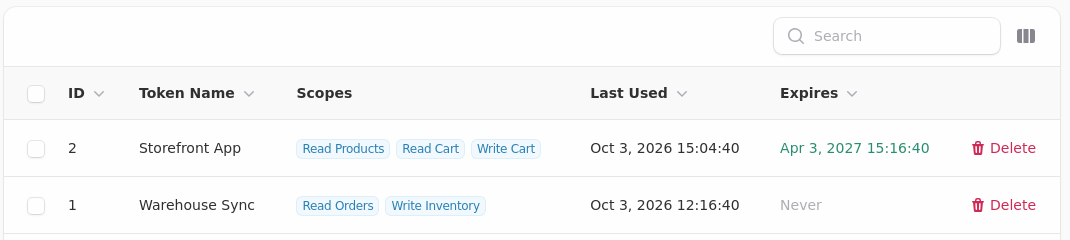
You will not see the token itself here, and neither will the merchant. It is shown once, when it is created. Asking a merchant to "resend" a token is asking them to issue a new one.
Making a Request
Send the token in the Authorization header.
GET /api/v1/products HTTP/1.1
Host: shop.example.com
Authorization: Bearer YOUR_TOKEN
Accept: application/json
The host is the shop's own domain. There is no central endpoint, because each shop is a separate tenant with its own data.
Abilities
A token carries a set of abilities, and the merchant chooses them when issuing it.
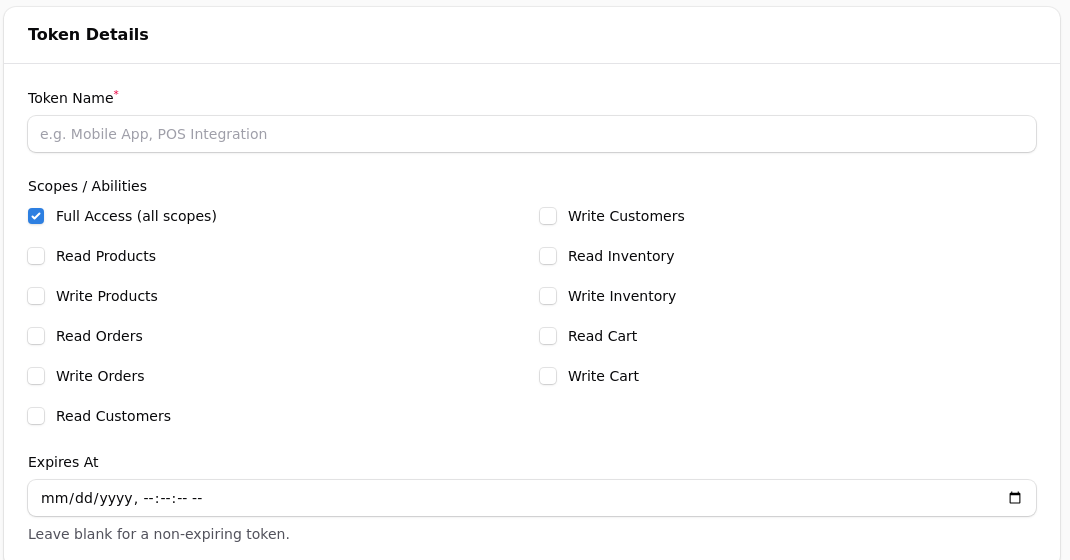
Full Access is ticked by default, so a merchant who presses through this screen without reading it hands you a token that can do everything. Tell them which scopes you actually need and ask them to tick only those: it is the difference between a mistake in your code being a bad request and being a deleted product.
| Ability | Allows |
|---|---|
read_products |
Reading products and categories |
write_products |
Creating and updating products |
read_orders |
Reading orders |
write_orders |
Creating and updating orders |
read_customers |
Reading customers |
write_customers |
Updating customers |
read_inventory |
Reading stock levels |
write_inventory |
Adjusting stock |
read_cart |
Reading a cart |
write_cart |
Changing a cart |
Ask for the narrowest set that does your job. A merchant looking at an install request for every ability is a merchant who does not install it.
A Token Can Only Do What It Was Given
Each endpoint requires the matching ability, and a token without it is refused with a 403 whatever else it holds. Full Access satisfies everything.
This was not always true. Until October 2026 the abilities were recorded and never checked, so any valid token could reach any endpoint. If you issued a read-only token before then and relied on it being read-only, it was not.
What the Failures Mean
| Status | Means |
|---|---|
| 401 Unauthenticated | No token was sent |
| 401 Invalid or expired token | The token is wrong, revoked, or past its expiry |
| 403 Insufficient permissions | The token is valid and lacks the ability for this endpoint |
The distinction between 401 and 403 is worth handling separately. A 401 means stop and ask the merchant to reconnect. A 403 means stop and ask for a different ability: retrying will never succeed.
Expiry and Revocation
A token can be given an expiry, and can be deleted at any time. Either stops it immediately.
Handle that gracefully. A merchant who revokes a token should see your integration say it has been disconnected, rather than failing silently or filling their logs.
Token Handling
The token is shown once, when it is created, and stored in a form that cannot be read back. If you lose it, the merchant issues another.
Store it as you would any secret: not in source control, not in a front end bundle, not in a log line. A token with write abilities can change prices and read customers.
Testing a Token
curl -s -o /dev/null -w "%{http_code}\n" \
  https://shop.example.com/api/v1/products \
  -H "Authorization: Bearer $TOKEN" \
  -H "Accept: application/json"
A 200 means the token works and carries read_products. A 403 means it works and does not. A 401 means it does not work at all.
That one call distinguishes the three cases and is worth building into your setup flow, so a merchant who pastes the wrong thing finds out immediately rather than when the first order arrives.
Always Send Accept
Accept: application/json
Without it, an error can come back as an HTML page rather than JSON, and your parser will fail on something that was trying to tell you what went wrong.
Redirects
Send requests to the shop's canonical address. A shop that redirects between its bare and www forms will cause some HTTP clients to drop the Authorization header on the redirect, which looks exactly like a bad token.
If a token works with curl and fails in your client, this is the first thing to check.
Rate Limits
Be reasonable rather than maximal. If you need a whole catalogue, page through it once and keep what you got, rather than asking for everything on a timer.
Where you need to know about changes, use a webhook rather than polling. That is the difference between one request when something happens and twelve an hour when nothing does.